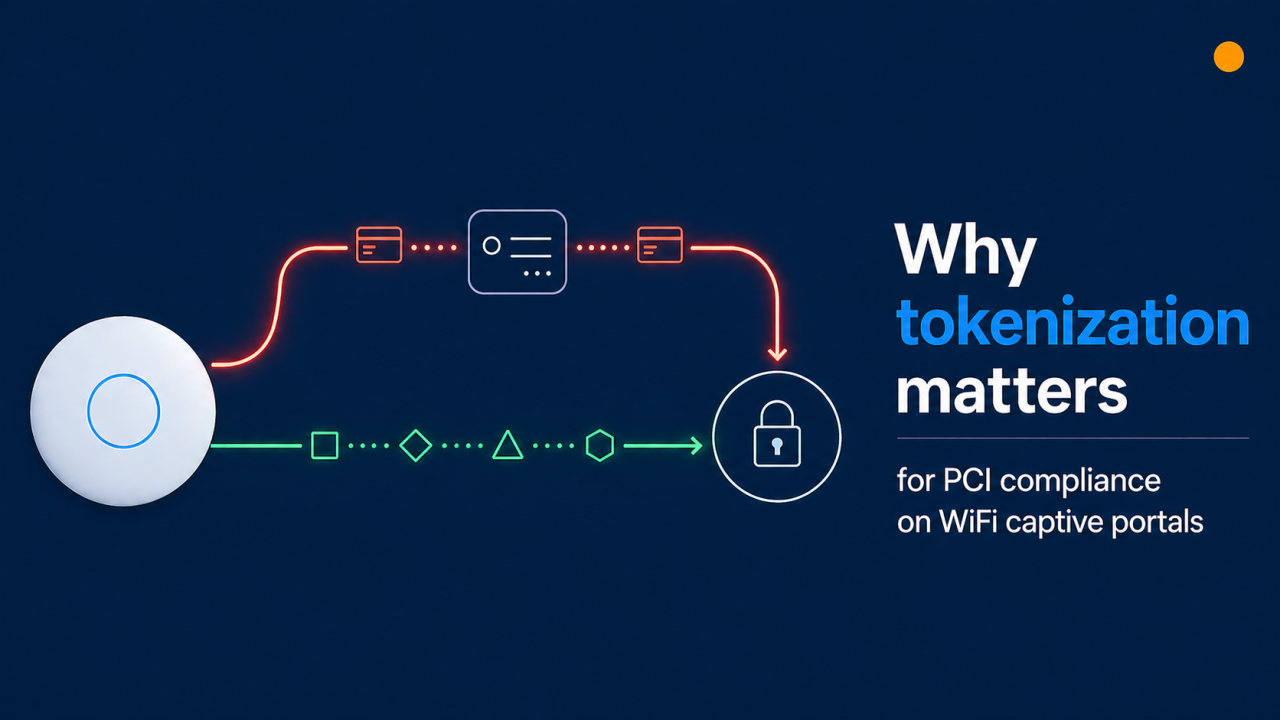
UniFi Captive Portals & Stripe Payments: Why Tokenization Matters for PCI Compliance
TL;DR
UniFi's built-in captive portal includes a paid-access feature that uses Stripe — convenient and quick to set up, but less secure than Stripe's recommended tokenized integration.
For commercial use, where card data flows matters: in the UniFi built-in captive portal flow, card details are submitted through the controller, which can broaden a merchant's PCI compliance scope from SAQ A to SAQ D.
Stripe's own recommendation is client-side tokenization (Stripe.js, Elements, or Checkout) — card data goes directly from the guest to Stripe, so it never touches the operator's servers.
The Art of WiFi external captive portal uses this tokenized flow end-to-end, so card data never reaches the UniFi controller or our portal server.
How UniFi's built-in Stripe payment feature works
The native UniFi paid-access feature, documented in Ubiquiti's UniFi Hotspots and Captive Portals help article, lets WiFi operators charge guests for internet access through Stripe. It is a useful starting point for small sites because it works out of the box: enable the Hotspot, choose Payment, connect a Stripe account, define packages, and you are live. Be aware, however, that Stripe has been tightening access to integrations that pass raw card details through merchant infrastructure — new accounts are not always granted the raw-card API permissions this method depends on, and long-term support for this approach is not guaranteed.
In that flow, the payment form is rendered by the UniFi controller. Card details are submitted to the controller, which then communicates with the Stripe API to charge the card. The convenience is real — and so is the architectural implication: the controller sits in the middle of the cardholder data transmission. That single fact is what drives most of the discussion below.
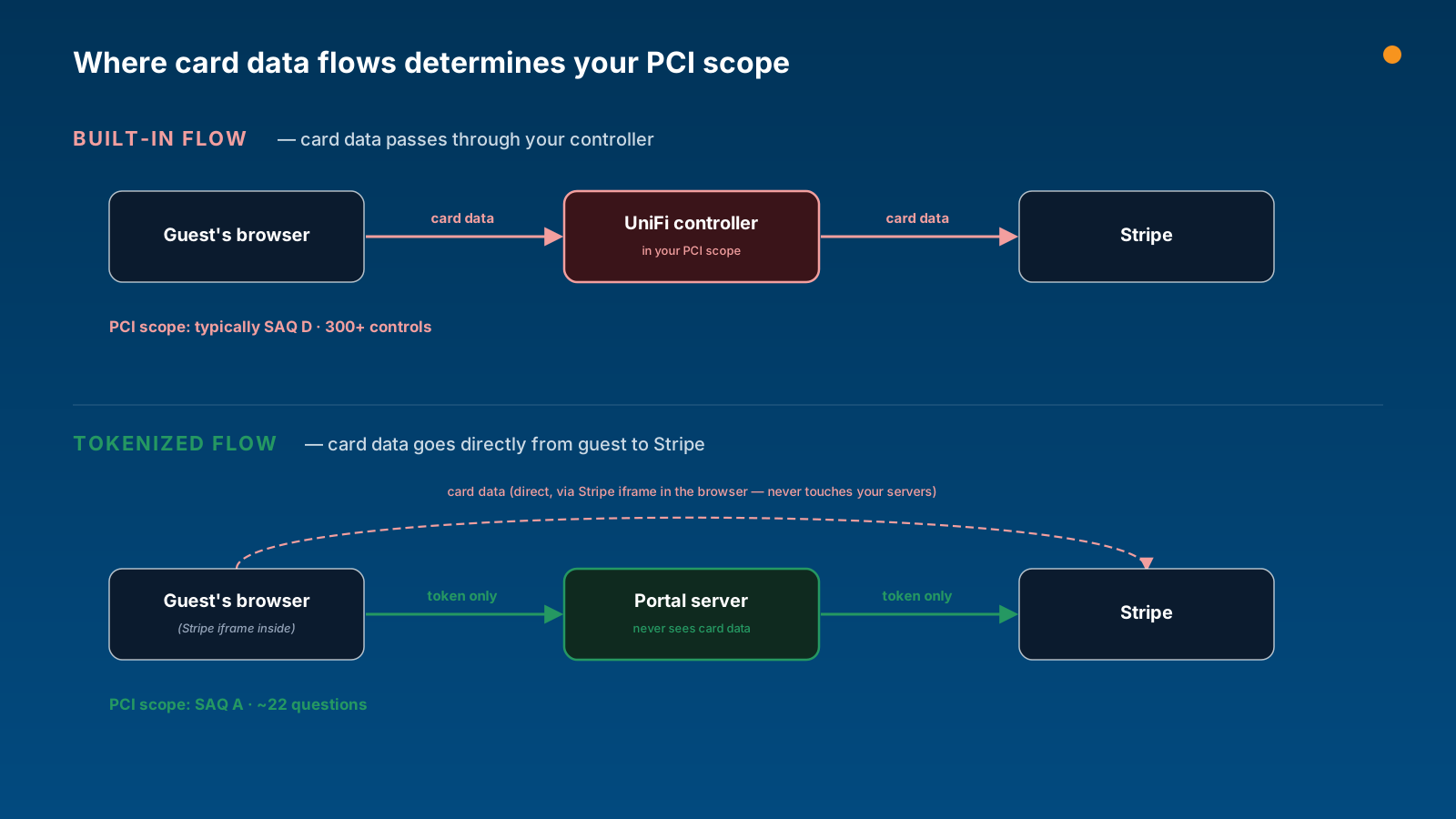
Where card data flows determines your PCI scope
Stripe is certified as a PCI Level 1 service provider end-to-end, but that certification does not transfer to merchants automatically. Your own PCI obligations depend on whether your infrastructure ever stores, processes, or transmits cardholder data. Stripe explains this directly in their PCI compliance guide:
"If your business handles sensitive credit card data directly when accepting payments, you might be required to meet more than 300 security controls in PCI DSS."
For e-commerce-style merchants, two self-assessment paths come up most often:
SAQ A — the simpler path
Applies when card data goes directly from the customer to Stripe (Checkout, Elements, or hosted iframes). Your servers only ever receive a token.
Roughly 22 questions, plus a quarterly ASV scan (now required for all SAQ A merchants).
Cost and effort are low. Most online businesses qualify for this tier.
SAQ D — the comprehensive path
Applies when cardholder data passes through, or is processed by, infrastructure you operate.
300+ controls across the questionnaire, plus quarterly ASV scans and an annual penetration test.
Cost and effort are significantly higher (auditor fees, scanning, longer questionnaire, additional security tooling).
See also: Stripe's PCI attestation overview. Always confirm your specific scope with a Qualified Security Assessor (QSA) — none of this article is legal advice.
What Stripe themselves recommend
Stripe is unambiguous about the right way to collect card data. From the Stripe Integration Security Guide:
"Stripe recommends using their payments integrations to perform this process on the client-side. This guarantees that no sensitive card data touches your server, and allows your integration to operate in a PCI-compliant way."
And from the Stripe API token reference:
"To use this functionality, you need to enable access to the raw card data APIs. In most cases, you can use the recommended payments integrations instead of using the API."
In other words, any flow that takes raw card data through a server you operate is the exception, not the default. The recommended pattern is to embed Stripe.js, Stripe Elements, or Stripe Checkout in the page so card details travel from the guest's browser straight to Stripe over a TLS connection that no one in the middle can read.
What 'tokenized' actually means in practice
Stripe walks through this in their Payment tokenization 101 explainer. When a guest types their card number into a Stripe-hosted field (delivered via an iframe or SDK), it is transmitted directly to Stripe over HTTPS. Stripe replaces the card details with a one-time token (or a reusable PaymentMethod ID) and returns that token to the merchant's page. The merchant's server then uses the token — not the card number — to create the charge.
Why this matters
PCI scope reduction. The PAN (primary account number) never touches the merchant's network — not in logs, not in application memory, not in web-server traffic, not in backups. SAQ A becomes the right questionnaire.
Better fraud signals. Stripe Radar fingerprints the card data at collection time. Tokenized integrations get the strongest signal; raw-card flows lose some of that.
For more depth, see Stripe's Payment Element vs Card Element comparison and the Payment Tokenization for businesses page.
How the Art of WiFi captive portal handles this
Our captive-portal solution is built around the flow Stripe recommends. Here's the data path end to end:
A guest connects to a UniFi-managed SSID. The UniFi controller places the device in a pending state and redirects the guest to our external portal — the standard external-portal handoff that UniFi supports.
The guest selects an access package and is shown a payment form rendered by Stripe Elements (an iframe served from Stripe's domain).
The card details go from the guest's browser directly to Stripe. Neither the UniFi controller nor our portal server can read them.
Stripe returns a token to our portal. We use the token to create the charge via the Stripe API and then poll Stripe to confirm the final transaction state — we deliberately avoid Stripe webhooks because they fire for every event in your Stripe account, which would mix portal traffic with any other charges you process.
After successful payment, our portal authorises the device on the controller through UniFi's external-portal authorisation API.
End result:
Card data never lands on the UniFi controller.
Card data never lands on our portal server.
Operators stay in SAQ A scope (always confirm with a QSA for your specific situation).
Full support for 3-D Secure / SCA, Stripe Radar fraud screening, and the Stripe CAPTCHA feature.
Other reasons commercial operators choose external portals
PCI scope is the headline, but it is rarely the only consideration. The built-in feature is intentionally simple — that is its strength. An external portal adds capabilities most commercial operators end up needing:
Self-service guest dashboards (top-ups, multi-device).
Voucher systems and bulk codes for events, resellers, and front-desk handouts.
Branded receipts.
Multi-property and multi-site reporting from a single dashboard.
When the built-in feature is the right fit
To be fair to the simpler path: the built-in Stripe option is fast to enable and zero infrastructure to maintain. It is a solid fit when:
Volume is low and ticket sizes are small (the operator is not a registered merchant operating commercially).
You want to validate whether paid access makes sense at all before investing in a richer setup.
You do not need email receipts, or guest self-service.
The right call depends on your scale and how much compliance work you are prepared to take on yourself. For most commercial deployments, an external tokenized portal pays for itself in reduced PCI overhead alone — before the operational features are even counted.
Quick wins for any UniFi paid-access deployment
Whichever flow you choose, these settings are worth confirming today:
Enable Secure Portal (HTTPS). Card details on plain HTTP are a non-starter.
Walled garden / pre-authorisation access list. Stripe's domains need to be reachable by guests before they authenticate, otherwise the payment form will not load.
Enable 3-D Secure / SCA payment flow when needed. Card networks now require it for many EU and UK transactions; Stripe handles it automatically when you use Elements or Checkout.
Schedule a quarterly ASV scan. It is now required even for SAQ A. Stripe's compliance dashboard can help you find an Approved Scanning Vendor.
Move to a tokenized flow
If you are running paid WiFi on UniFi at any commercial scale, moving to a tokenized external captive portal usually pays for itself in reduced compliance overhead alone, before the operational features are even counted.
Explore the features on our UniFi Captive Portal for Paid WiFi Access page.
This article is for general information only and is not legal, accounting, or compliance advice. Verify your specific PCI obligations with a Qualified Security Assessor.
Frequently Asked Questions
Is the UniFi built-in captive portal PCI compliant?
Stripe is PCI Level 1 certified, but PCI compliance is a shared responsibility — the merchant is also obliged to attest annually. With the UniFi built-in captive portal flow, card data is transmitted through the controller, which typically maps to SAQ D rather than SAQ A. Confirm your specific scope with a QSA and review Stripe's PCI compliance guide.
Can I use Stripe with UniFi safely?
Yes. The safest path is to pair UniFi with an external captive portal that integrates Stripe via Elements or Checkout, so card data flows directly from the guest to Stripe.
What is the difference between SAQ A and SAQ D?
SAQ A is for merchants who fully outsource cardholder data handling — roughly 22 questions plus a quarterly ASV scan. SAQ D is for merchants whose systems store, process, or transmit cardholder data — over 300 controls, plus quarterly scans and annual penetration testing.
Does Art of WiFi store any card data?
No. We use Stripe Elements; card details go directly from the guest's browser to Stripe. We only receive and store Stripe payment tokens and IDs.
Will I still get all the Stripe features?
Yes — using an external portal with Elements gives you the full Stripe feature set, including 3-D Secure, Radar fraud protection, the Stripe CAPTCHA feature, and reporting from the standard Stripe dashboard.
Posted on: April 26th, 2026
By: Erik Slooff
On: Captive Portals
stripe
tokenized payments
captive portal
PCI
unifi
About the author

Erik Slooff
Owner & Lead Developer
For more than 10 years I’ve specialised in UniFi® guest-WiFi solutions—ranging from email-capture and SMS phone-number verification to Azure Entra ID single-sign-on and multi-site analytics dashboards. Posting as @slooffmaster in the Ubiquiti Community, I’ve contributed 160 + posts, 8300 + replies and 300 + accepted solutions that help network admins worldwide. Today our solutions secure and provide analytics for 2500 + UniFi networks across retail, hospitality, government and education in 70 + countries. Customers use our solutions to authenticate users, meet regional privacy requirements (GDPR, CCPA, etc.) and unlock marketing or loyalty insights, and more. When I’m not refining captive-portal flows, you’ll find me benchmarking new UniFi firmware or contributing to our open-source code on GitHub.