Charge for Guest WiFi on UniFi — Stripe Captive Portal
Charge for guest WiFi on your UniFi network with our Stripe-powered captive portal. Sell time-based passes (hourly, daily, weekly, monthly), data-based passes (per-GB), or one-off access — guests pay at the splash page — by card, or with Apple Pay, Google Pay and other wallets — see their access code on screen, receive an automatic receipt by email, and manage their own devices through a self-service portal. The checkout is built for phones.
Because payments run through Stripe — the in-page Elements form or Stripe's hosted checkout — your UniFi controller and our captive portal never touch sensitive cardholder data. That keeps you at PCI SAQ A in most cases (verify with Stripe), reducing your compliance burden and cost.
In active use at marinas, RV parks, campsites, holiday resorts, and student housing projects.
Features
Our captive portal with Stripe integration is in use across a growing number of clients in various environments, such as marinas, RV parks, campsites, and student housing projects.
It offers the following features:
Leverages Stripe’s tokenized payments using their Elements platform for reduced PCI compliance requirements (SAQ A in most cases; please verify with Stripe). By exchanging tokens between the captive portal and Stripe, the captive portal itself does not need to touch or store any sensitive credit card data. More details on PCI compliance can be found here: https://stripe.com/en-nl/guides/pci-compliance
Full support for the current Strong customer authentication (SCA) requirements that are used with VISA 3-D Secure and many other credit card brands.
Full support for Stripe's CAPTCHA feature.
Multiple voucher packages can be created for each site, each with their own values for:
max. device count
duration
cost and currency
upload and download speed limits
The ability to create free trial vouchers with controls to limit the number of free trials a guest can use within a given timeframe.
An optional self-service dashboard for guests, allowing them to:
manage their active devices
manually add/remove devices which is useful when dealing with devices that are unable to access a captive portal (TVs, game consoles, etc.)
extend an existing voucher for more time or data without purchasing a new pass
enable/disable optional recurring payments
update their card details
Guests can also use voucher codes that are created through the UniFi Hotspot Manager; both single-device and multi-device UniFi vouchers are supported.
Supports multiple sites on multiple UniFi controllers from a single installation.
Each captive portal site can be connected to its own Stripe account.
A web-based backend to manage:
captive portal settings per site
captive portal styling (logo, background, colours, text strings, etc.) per site
captive portal Terms of Service per site
UniFi controller integration per site
the data retention period per site
admin accounts and assigning them to one or more sites
the theme used for the management back-end as well as the logo
Stripe-hosted checkout with Apple Pay, Google Pay and Link. Optionally let Stripe present the entire payment screen, bringing the wallet payment methods guests expect on their phones — plus any other method enabled in your Stripe account — with no extra setup. The in-page card form remains available.
Recurring payments, switched on per site. Offer passes that renew automatically; guests can pause or stop the renewal themselves from the self-service portal.
Refunds from the admin pages. Full or partial, in several steps if needed, with the refund history shown per charge. A refund can also end the guest’s WiFi access and stop recurring billing in the same step, and a refund marked as fraudulent is reported to Stripe so the card is blocked.
Support tools for day-to-day operation. Resend a guest’s voucher email in one click, keep a copy of every email the portal sends to guests, and retain the purchase history for as long as you choose.
Reliable payment completion. Purchases are finalised correctly even when a bank’s card authentication is slow or a guest abandons the checkout — no double charges and no lost passes.
Screenshots
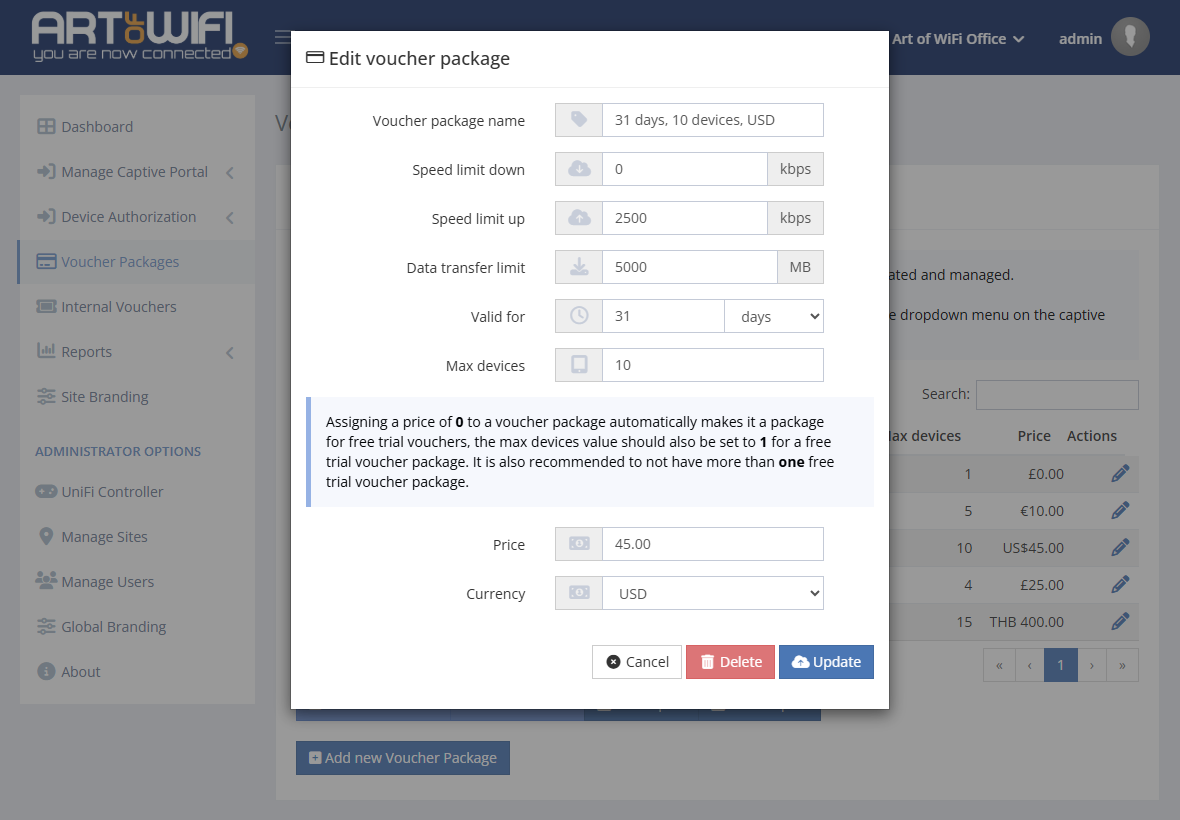
Managing voucher packages
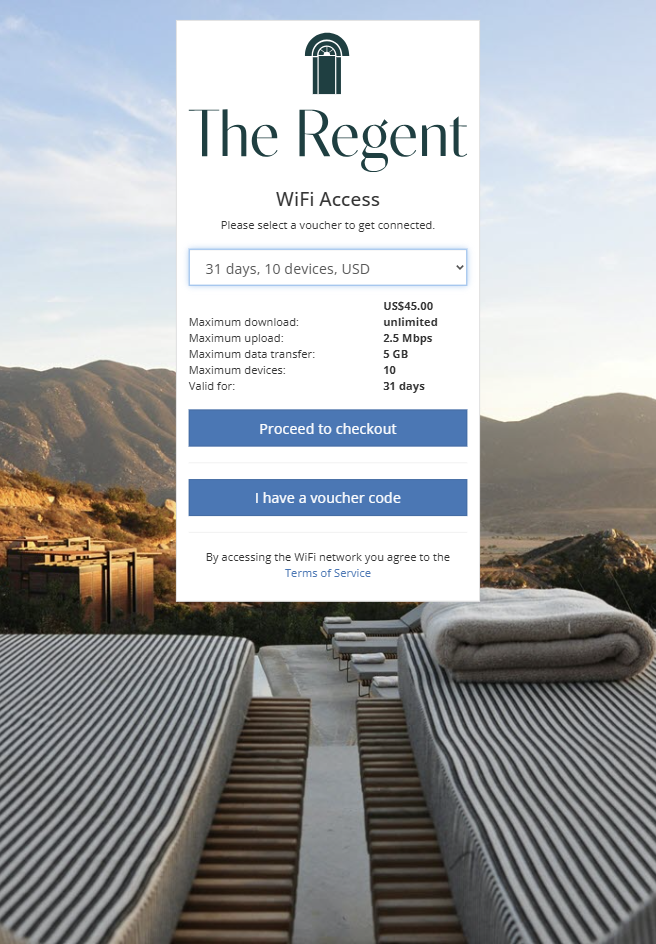
Splash page with voucher selected
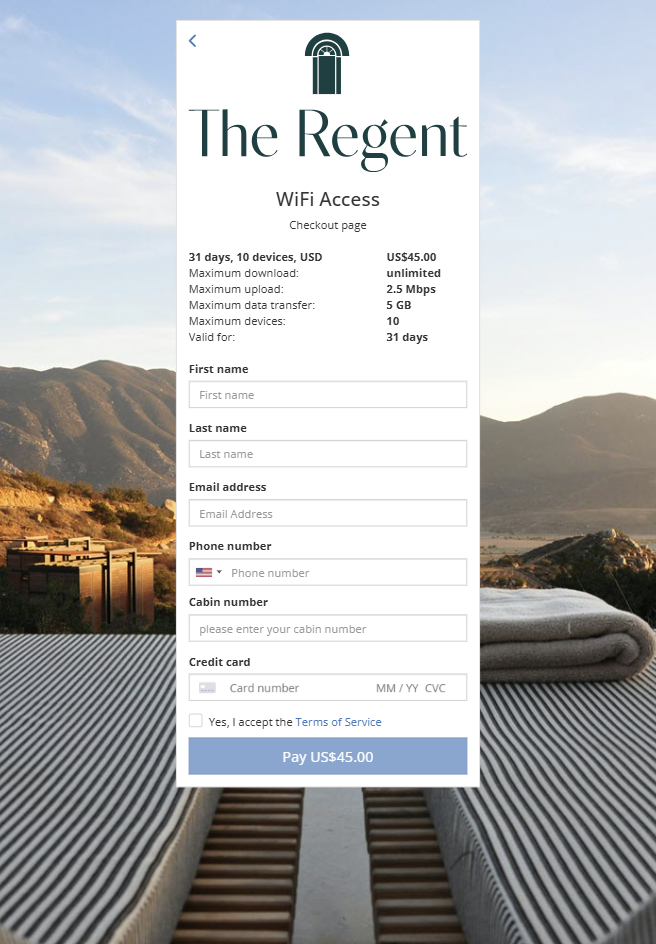
Stripe checkout page
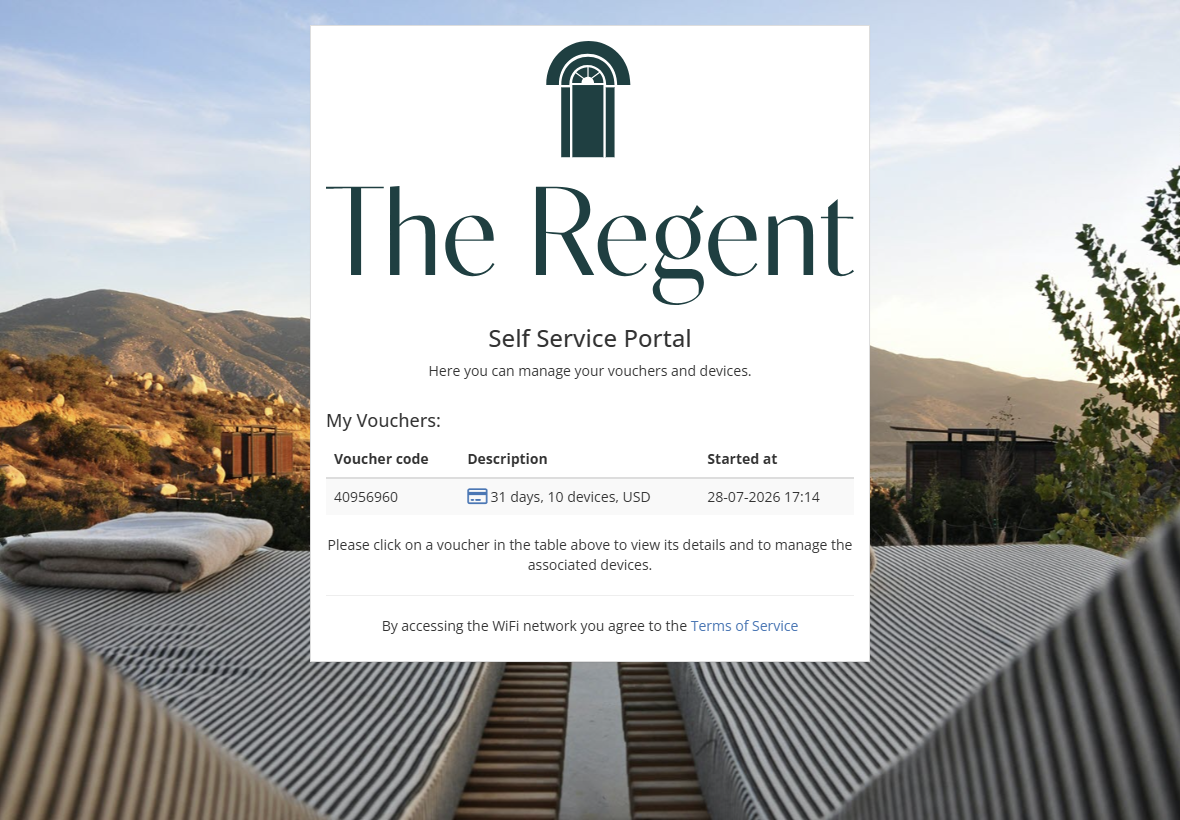
Self-service portal
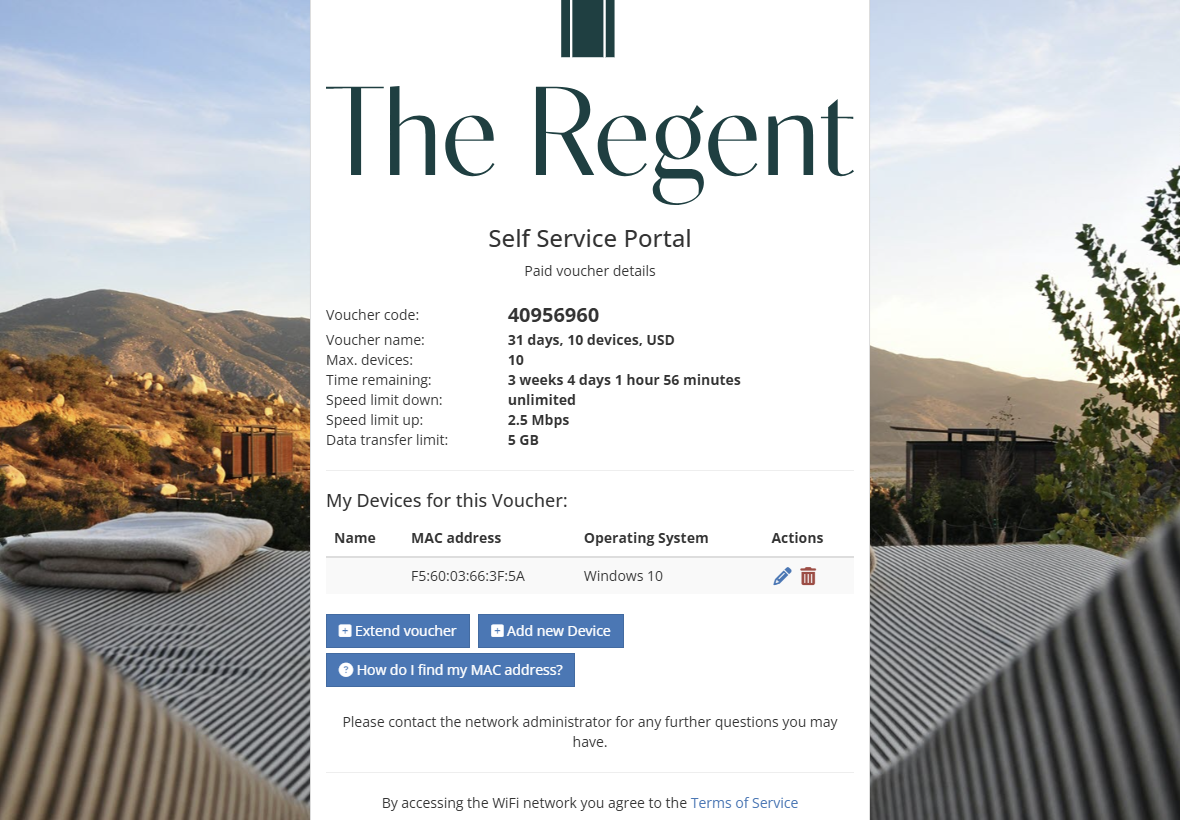
Voucher usage details
Want to learn more about our Paid Access Captive Portal?
Frequently Asked Questions
How do I charge for guest WiFi on a UniFi network?
UniFi's built-in captive portal doesn't support secure payments natively. To charge guests, you need an external captive portal that connects to a payment processor. Our Art of WiFi captive portal integrates with Stripe: guests connect to your guest SSID, land on your splash page, choose a pass (time-based, data-based, or one-off), pay by credit card, and get instant access. The whole flow takes under a minute per guest.
Does UniFi's built-in captive portal support secure payments?
No. The built-in UniFi Guest Portal supports simple splash pages, vouchers, and third-party auth (Facebook, Google, RADIUS), but has no native secure payment integration. If you need to accept credit card payments for WiFi access, you need an external captive portal solution like ours.
Can I use Stripe with UniFi's captive portal?
Not with the built-in UniFi Guest Portal — it has no Stripe integration. Our external captive portal for UniFi provides a full Stripe integration using Stripe Elements for tokenized payments (PCI SAQ A eligible), plus voucher-package management, auto-receipts, and a guest self-service portal.
What kinds of WiFi passes can I sell?
You can define time-based passes (per hour, day, week, or month), data-based passes (per GB), or one-off access passes. Each pass can have its own price, speed limit, and duration. Guests choose from your defined packages at the splash page, pay via Stripe, and their access is provisioned automatically for the pass duration or data quota.
What is the Paid-Access captive portal for UniFi?
It’s our UniFi-compatible portal designed to sell internet access—you define voucher packages (usages, time, data, pricing), take online payments, and the portal applies access automatically after purchase. Users get access to a self-service portal to manage their vouchers and devices.
Which payment methods are supported?
We support Stripe for card payments; with Stripe’s hosted checkout enabled, guests can also pay with Apple Pay, Google Pay and Link. Payments run through Stripe’s token-based platform; the software doesn’t store any card data on your server.
Can we set our own pricing and voucher package types?
Yes—you create your own voucher packages; choose currency, price, number of usages and validity, and optionally offer free trials.
How is the software licensed?
Licensing is per site with unlimited APs per site, add more sites as needed. Contact us for licensing details.
How are payments handled—do you take a cut?
You connect your own Stripe account, and all payments settle directly to you. Art of WiFi does not charge any percentage or per-transaction fee on your revenue—our pricing is a one-time license per site (with optional support). Standard Stripe processing fees apply, and card data stays with Stripe’s PCI-compliant checkout (our software is self-hosted and it does not "touch" any sensitive card or cardholder data).
How are taxes and invoices handled?
You can collect invoice/Tax/VAT details at checkout. The software emails the receipt after checkout, and you can export transactions for accounting and issue full or partial refunds directly from the admin pages — refunds made in your Stripe dashboard are picked up as well. The layout of the email receipts can be fully modified to meet your requirements.
Can we brand or white-label the portal?
Yes—run it on your domain, use your logo, colors, and CSS, and remove the Art of WiFi branding. Each site can have its own look and post-login redirect.
Which UniFi versions are supported?
Works with all current versions of UniFi OS consoles (UDM/UDR/UXG), UniFi OS Server, and the classic Network Application, including multi-site deployments from a single dashboard.
Will UI.com MFA break the captive portal for paid access?
No—configure a local admin on your UniFi controller for API access. This avoids cloud-account MFA interruptions and keeps purchases flowing.
What happens if Stripe or the portal is temporarily unavailable?
Your UniFi network stays up. If checkout is down, guests can’t buy new passes; we recommend keeping our "internal" vouchers as a simple fallback for critical venues. Purchases already in progress complete correctly even when a bank’s card authentication is slow or a guest abandons the checkout — no double charges and no lost passes.
How quickly can we go live?
Most teams launch in under a day or two on a small (virtual) server: connect UniFi, create your voucher packages and pricing, connect to Stripe, and point DNS/SSL. Provide branding and you’re ready to sell access.
Who hosts the data?
For the captive portal for paid access, everything runs on your own server, with configurable retention and exports.
Can I refund a guest?
Yes. Refunds are issued from the admin pages — full or partial, in several steps if needed, with the refund history shown for each charge. When you refund you can also end the guest’s WiFi access and stop any recurring billing in the same step, and a refund marked as fraudulent is reported to Stripe so the card is blocked from further purchases.
Can I offer passes that renew automatically?
Yes. Recurring payments can be switched on per site: guests buy a pass that renews automatically and can pause or stop the renewal themselves from the self-service portal. Ideal for long-stay guests, seasonal moorings and residents.
What if a guest says the voucher email never arrived?
Resend it with one click from the purchases overview. The portal can also keep a copy of every email it sends to guests, so you can see exactly what was sent and when — and the access code is shown on screen right after payment, so a mistyped email address isn’t a problem.