Scheduled PDF reports for your UniFi networks
Our Scheduled Reporting solution for UniFi networks generates a monthly PDF report for every site you manage and emails it to the clients and stakeholders you choose, so they see how their network performed without anyone exporting a thing.
Why service providers and network teams use it
Automated, consistent reporting
Every site gets its report on the same monthly schedule, sent to the to, cc and bcc recipients you set per site. No manual exports, no forgotten months.
Talking points for every client
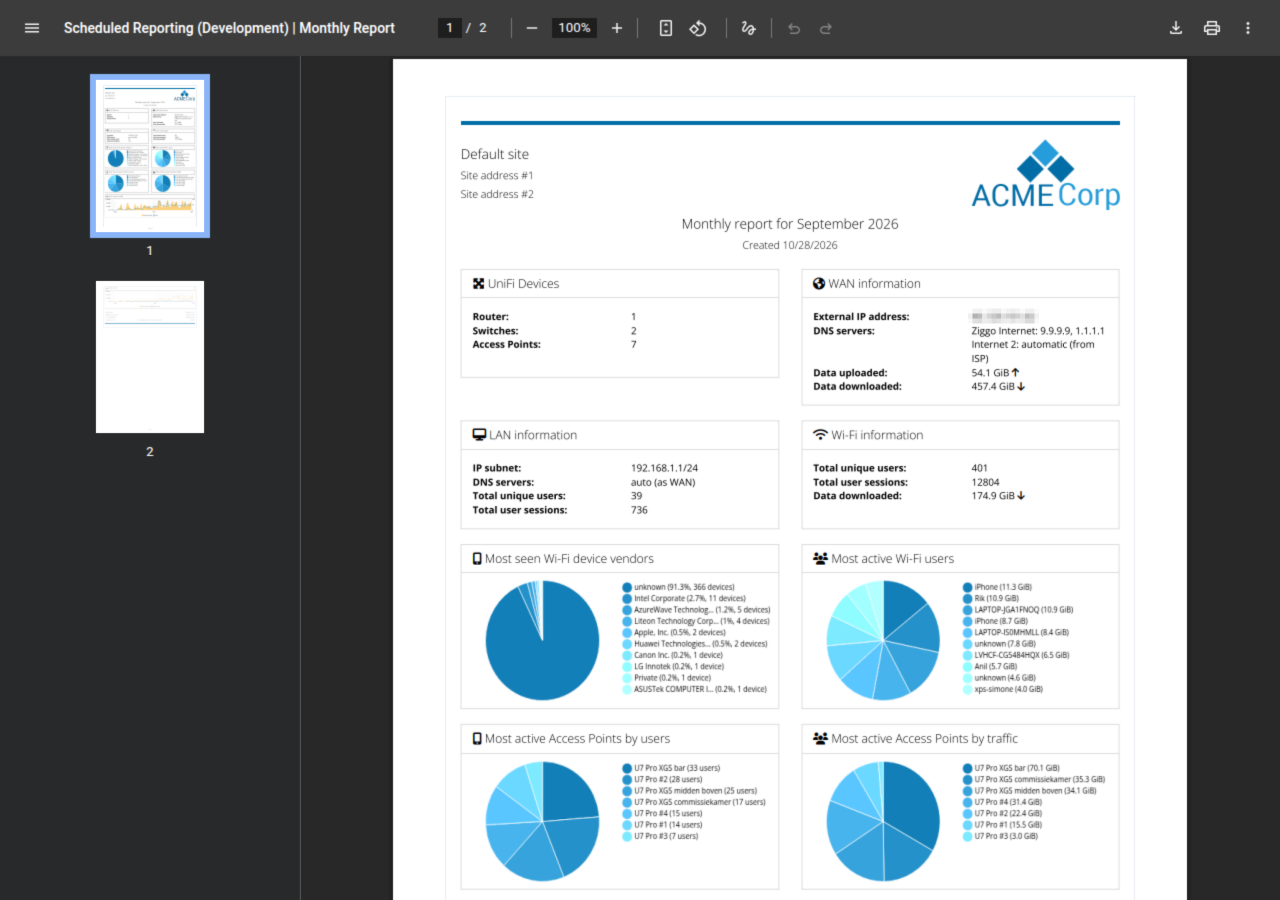
Each report puts WAN and Wi-Fi usage, the busiest access points, the most active users and the device mix in front of your clients, which gives you concrete numbers to discuss.
Scales with low-touch management
Sites, report brandings and administrator access are managed from one web-based backend, so adding a client is a matter of configuration, not extra work every month.
Features
Web-based backend to manage the following:
-
Sites and their UniFi controller connection.
-
Reports settings per site to define client name, address, and email recipients (to, cc and bcc).
-
Report “Brandings” that are applied to one or more sites and each contain your company name, logo, address details, styling to apply to the reports, and much more.
-
Administrator accounts can be assigned to one or more sites.
-
The theme and logo used for the management pages.
Integrates with your own UniFi controller(s)
-
Easy integration with your own UniFi controller(s)
-
Supports all current versions of UniFi controllers and UniFi OS consoles.
Scheduled Reports
-
Fetches main and critical metrics from all connected sites on a monthly basis.
-
Generates a PDF report with specific styling applied based on the selected branding.
-
Sends an email to the selected recipients with the PDF report attached.
-
When also using a UniFi gateway and/or UniFi switches, the report layout automatically adapts to include information related to the LAN.
Screenshots


Who for
Whether you manage your own UniFi network(s) and wish to inform stakeholders regarding the performance of your networks or are a service provider looking for a fast to deploy, scalable, and stable solution to inform your clients about their networks’ performance on a regular basis, our Scheduled Reporting solution is a perfect match for you. Please contact us for more information about our Scheduled Reporting solution for UniFi networks, pricing details or a demo.

Art of WiFi has proven to be a brilliant solution for our custom captive portal needs. It has allowed us to provide secure, customizable captive portals to existing hardware and network configurations for multiple sites. Erik has been ready, willing, and able to assist every step of the way, and we could not have asked for anything more. Top tier functionality with top tier support.

Plexus Technology
Technical Engineer
Frequently Asked Questions
What is in a scheduled report?
Each report covers the UniFi devices on the site, WAN information and Wi-Fi usage, the most seen device vendors, the most active users and access points, and Wi-Fi users and traffic over the last 12 months. When the site also uses a UniFi gateway and/or UniFi switches, the layout automatically adds LAN information.
How often are reports sent, and to whom?
Reports are generated monthly. For each site you set the recipients yourself, with to, cc and bcc addresses, and they receive the report as a PDF attachment.
Can the reports carry our own branding?
Yes. A branding holds your company name, logo, address details and the styling applied to the report, and you can assign one branding to one or more sites.
Which UniFi controllers are supported?
Scheduled Reporting integrates with your own UniFi controller(s) and supports all current versions of UniFi controllers and UniFi OS consoles.
How do I get pricing or a demo?
Contact us with a short description of your setup and the number of sites you want to report on, and we will send you pricing details or set up a demo.