Report on WAN transfer volumes and individual user activity over time
Our UniFi WAN and client usage reporting tool generates detailed reports on client activity, WAN traffic volume, and access point performance across your UniFi gateway and APs within a specified date range.
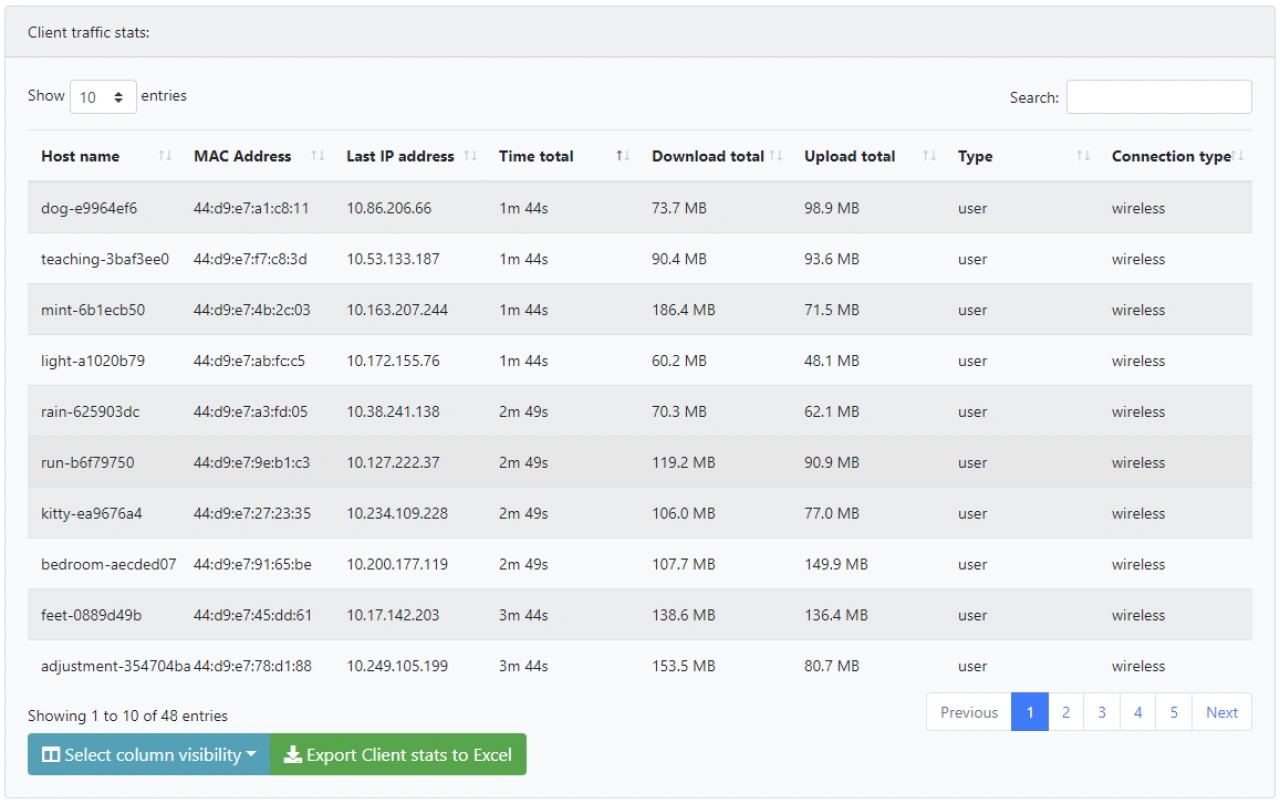
Two tabs, one report: switch between per-client usage (host, IP, download/upload, session count, last-connected AP, connection-time totals) and per-AP performance (RX/TX bytes, average clients, satisfaction, TX retries, Wi-Fi drops). Sort, filter, and export either view to Excel.
Quick and easy reporting across multiple UniFi sites: configure multiple UniFi controllers or UniFi OS Consoles and generate reports for any of the available sites.
Runs on your own web server — controller credentials and report data never leave your network. Authenticate with a Network Application API Key, the Site Manager API via unifi.ui.com, or a classic local admin account.
Access point performance in the same report
The new Access point stats tab summarises each AP's contribution over the selected date range: RX/TX traffic, average concurrent clients, average client satisfaction, TX retry rate, and Wi-Fi TX drop rate. Aggregated totals across all APs are shown in the footer row, so you can spot which APs carry the most load, which have the least-happy clients, and which are quietly dropping frames.
Trace clients back to the AP they last used
The client traffic table now includes Last connected to — the specific AP each client was most recently associated with — and Session count, the number of distinct wireless sessions the client had in the date range. Combined, they answer two of the most-asked support questions: which AP were they on when it broke, and how much has this device been coming and going?
Multi-site support
This the dropdown menu that shows all available sites after having selected a UniFi controller:

Total connection times
Looking for detailed total connection times of the clients? That’s a configurable option:
Requirements
Server
-
A web server running a recent Linux version with PHP 7.4 or higher and the php-curl extension installed.
-
Tested on Apache 2.4 with PHP 7.4, 8.1, 8.2, and 8.3. Other web servers such as nginx and LiteSpeed should also work. Microsoft IIS is not supported.
Network connectivity
-
For a direct connection, each controller must be reachable from the web server on port 8443 (Network Application), port 443 (UniFi OS Console), or port 11443 (UniFi OS Server).
-
No direct network path? The tool can also reach your controllers through the Site Manager API via the unifi.ui.com cloud. This works for any cloud-enabled controller, including ones behind a firewall, on a remote network, or behind Starlink CGNAT where inbound ports cannot be opened.
UniFi controller
-
Supported platforms include the software-based Network Application, UniFi OS Server, and UniFi OS devices such as CloudKeys, UDRs, UDMs, and UDM-Pros.
-
Network Application versions 5.x through 10.x are supported; version 10.6.101 has been confirmed to work. UniFi OS versions 3.x through 5.x are supported (5.1.33 confirmed).
Purchase a license
-
The one-time cost for a single license is € 60,00 (excluding VAT/Sales Tax). This includes access to updates for 12 months.
-
The actual VAT/Sales Tax is calculated upon checkout.
-
EU-based companies can enter their VAT number for 0% VAT.
-
Paddle, our billing partner, supports multiple payment methods depending on your country.