Working with UniFi APIs
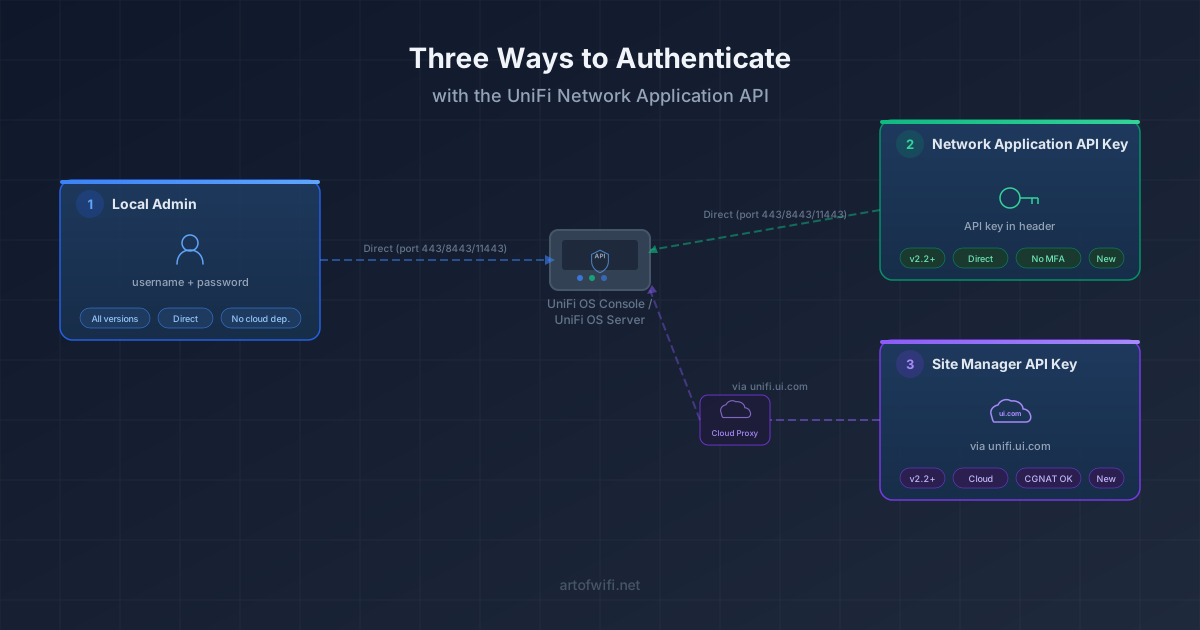
Ubiquiti exposes three different API surfaces for the UniFi platform: the long-standing internal Network Application API, the newer official Network Application API, and the cloud-based Site Manager API on unifi.ui.com. Each one has different authentication, different coverage, and different trade-offs.
This page is an orientation guide: which API is right for which use case, how authentication works on each, what our open-source PHP clients cover, and what kinds of integrations and tools you can build on top.
We've been building applications and tools on the UniFi API since 2015, and our open-source PHP clients are used by thousands of developers and network administrators worldwide.
Maintained by the team behind the most-used open-source PHP UniFi API client (1,300+ GitHub stars)
The three UniFi API surfaces at a glance
Internal Network Application API
The long-standing, undocumented API used internally by the UniFi web interface itself. Authenticates with username and password against a controller (a dedicated local admin account is recommended). Coverage is broad — almost anything you can do in the UI is reachable here — but the surface can change between Network Application versions.
Best for: self-hosted setups, deep functionality, and integrations that need endpoints not yet exposed by the official API. The de-facto industry standard for over a decade.
Official Network Application API
The newer, fully documented and Ubiquiti-supported API surface, available on Network Application 10.1.84 and higher. Documentation is built directly into the Network Application under Settings → Integrations.
Authentication uses an API key generated from inside the Network Application — no session management, no password exposure. Surface area is narrower than the internal API but expanding rapidly with each release.
Best for: new integrations targeting current versions, where stability and clean auth matter more than maximum endpoint coverage.
Site Manager API (unifi.ui.com)
Ubiquiti's cloud-based API for accounts using Site Manager (unifi.ui.com). Authenticates with an API key tied to a UI.com account; calls flow through Ubiquiti's cloud rather than directly to your controller.
Particularly useful when controllers sit behind CGNAT, dynamic IPs, or restrictive firewalls — your integration doesn't need direct network access to the gateway.
Best for: cloud-managed and multi-site deployments where reaching every controller directly is impractical. Endpoint coverage is currently focused on host, site, and device-level visibility.
Authentication: which method should you use?
Each API surface uses a different authentication model. The internal Network Application API uses a username/password — for automation, always create a dedicated local admin account on the controller rather than reusing your UI.com cloud login (cloud accounts are subject to MFA and break automated logins).
The official Network Application API uses a Network Application API key, generated from inside the Network Application UI. The Site Manager API uses a separate Site Manager API key, tied to your UI.com account, generated at unifi.ui.com/api.
We've written a full comparison covering when each method makes sense — including handling of MFA, token rotation, and self-hosted vs. cloud setups: UniFi API authentication: local admin vs. API key vs. Site Manager.
Open-source UniFi API clients by Art of WiFi
PHP UniFi API Client (internal API)
1,300+ GitHub stars, 385,000+ Packagist downloads. Our long-standing, dependency-free PHP client for the internal Network Application API.
Compatible with UniFi versions 5.x through 10.x and UniFi OS 3.x through 5.x. Includes a custom_api_request() escape hatch for endpoints not explicitly wrapped, so you're never blocked when Ubiquiti adds something new. Initial release in 2015, MIT-licensed, actively maintained.
GitHub · Packagist · Project page
PHP UniFi Network Application API Client (official API)
A modern PHP 8.1+ client for the official Network Application API. Built on Saloon v3, with a fluent interface, type-safe filter builders, and IDE auto-completion across the surface.
Covers sites, devices, connected clients, networks, WiFi broadcasts, hotspot vouchers, firewall zones and policies, ACL rules, DNS policies, and more. Released February 2026, expanding alongside the official API. MIT-licensed.
GitHub · Packagist · Project page
PHP UniFi Cloud API Client (Site Manager)
PHP 8.1+ client for the official UniFi Cloud / Site Manager API. Useful when controllers aren't directly reachable (CGNAT, dynamic IPs, restricted networks) since the Cloud API routes calls through Ubiquiti.
Supports listing hosts, sites, and devices via the documented Site Manager endpoints; coverage will expand alongside Ubiquiti's API. MIT-licensed.
GitHub · Packagist
What you can build with the UniFi API
Device inventory and search
Pull a unified view of every gateway, switch, and access point across all your sites — search by name, model, MAC, IP, firmware version, or EOL/LTS state, then export.
Captive portals and paid WiFi
Build branded guest WiFi flows with email capture, SMS verification, social login, vouchers, or paid access — without the controller ever touching cardholder data.
Scheduled and PDF reporting
Automate periodic site, device, and client reports — branded, scheduled to email or shared storage, ideal for managed service providers reporting to clients.
WAN and client usage monitoring
Track per-client and per-WAN bandwidth usage over time, including data caps, alerts, and chargeback-style reports for tenants or business units.
Multi-site NOC dashboards
A single pane of glass over many controllers and many sites — uptime, alerts, firmware status, client counts — useful for managed service providers and large operations.
Custom integrations and automation
Webhooks, CRM sync, billing platforms, building-management systems, ticket creation, bulk configuration — most of UniFi's interesting wiring lives in the API. We can build it, or help you build it.
Building something with the UniFi API?
We've spent more than a decade integrating with UniFi networks, from small single-controller deployments to multi-site cloud-managed operations. Whether you need help shaping a custom integration, advice on which API surface fits your use case, or a fully built solution we deliver and maintain, we'd be happy to hear from you.

Frequently Asked Questions
Which UniFi API should I use for a new integration?
It depends on what you need to do and where the controller lives. If the endpoints you need are covered by the official Network Application API and your controller is directly reachable, that is usually the cleanest choice — documented, API key auth, stable surface. If you need broader endpoint coverage, the internal API (via our long-running PHP client) covers more ground but uses username/password auth and a less stable surface. If your controller is behind CGNAT or otherwise hard to reach, the Site Manager API on unifi.ui.com is often the only practical option.
Is the internal Network Application API going away?
Ubiquiti has not announced any deprecation. The internal API continues to power the UniFi web interface itself, so its longevity is tied to the UI. That said, Ubiquiti is clearly investing in the official API, and we expect its surface to grow over time. New integrations should consider the official API first; the internal API remains valuable for endpoints that the official API does not yet expose.
Can I use the same client for self-hosted and UniFi OS consoles?
Yes. Our internal-API PHP client supports the standalone Network Application (port 8443), UniFi OS consoles such as UDM/UDM-Pro/Cloud Key (port 443), and UniFi OS Server (port 11443). The official Network Application API client works against any UniFi OS console running Network Application 10.1.84 or higher.
Do these clients require PHP, or can I use them from another language?
Our published clients are PHP. The wire-level APIs themselves are language-agnostic, so any HTTP client in any language can talk to them — see the official Ubiquiti documentation for endpoint details. If you want a managed solution that already integrates with these APIs, take a look at our captive portal and reporting products.
Why a dedicated local admin account instead of my UI.com account?
Since July 2024, Ubiquiti enforces multi-factor authentication on UI.com accounts, which breaks non-interactive automated logins. A dedicated local admin account on the controller is not subject to MFA and is the safest, most predictable choice for automation. We cover this in detail in Use a local admin account for UniFi API and captive portal integrations.